Instruction Manual
Charging
Keep your battery charged and use it all day without worry, as the rechargeable battery allows up to 30 hours of continuous use.
Putting on the Colibri
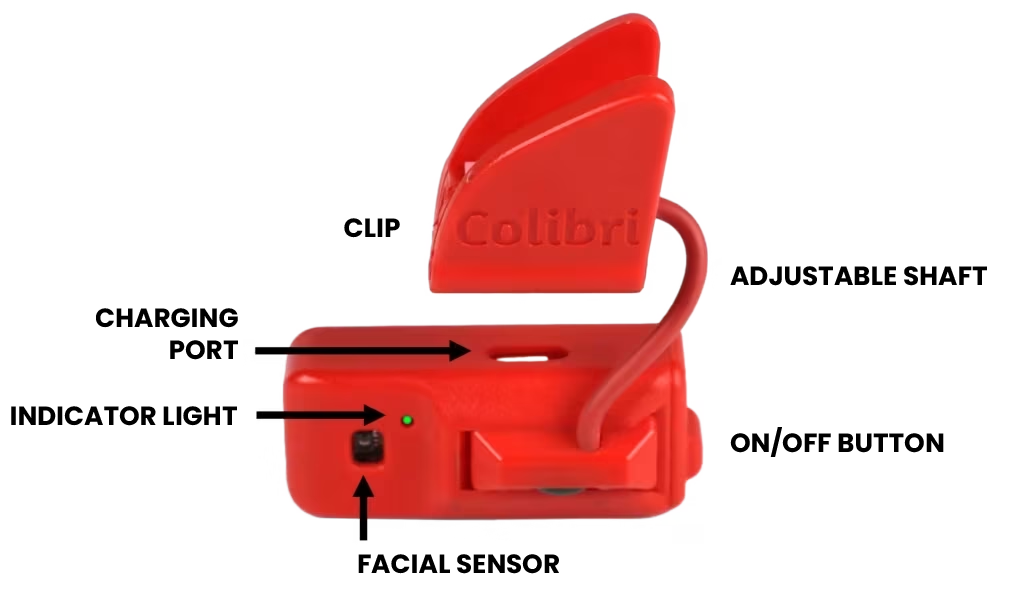
Attach the Colibri to the temple of your glasses using the clip and adjust its position using the flexible arm. The arrow should always point forward.
Pairing
Find Colibri in your device’s wireless connection settings menu and click pair to establish the connection.
Cursor movement
Learn the best movements to place the cursor anywhere on the screen with speed and precision.
Click options
Choose the best way to click: automatic clicking is easy and simple to start with, but facial gesture-activated clicking allows for more complex actions.
Screen scrolling
Navigate feeds and lists with agility using scrolling by slowly tilting your head towards your right or left shoulder.
Suspension
We don’t need to control the mouse all the time, right? No problem: disable and re-enable Colibri simply by moving your head to show “NO” and “YES”.
Right click
Learn how to activate the right-click function of the mouse using the nodding gesture (YES).
Advanced settings
Access more settings. Some people need special adjustments to make the best use of the available movements.