
To use Colibri, it needs to be attached to an eyeglass frame. It can be attached to the user’s own glasses or to the lensless plastic frame that comes with the product.
Putting on the Colibri
IMPORTANT: If you intend to place the Colibri on another person’s face, it is recommended that you first try the device on yourself, so that you can get a feel for the sensitivity and ideal positioning of the device.
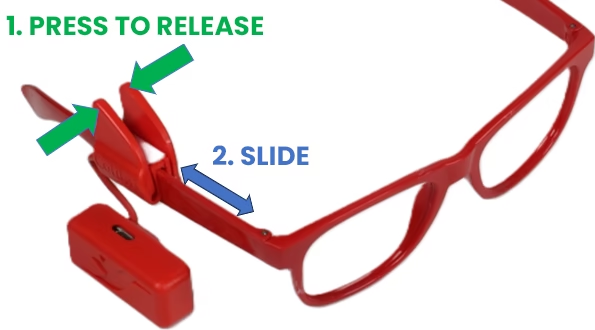
To position it on any frame, firmly press the tabs of the fastener (holding the part above the name “Colibri”) while sliding the device along the temple of the glasses*, as shown in the image. Note that the fastener has a groove on the inside, designed to help mount it on thinner frames. If this is the case, make sure the thin temple of the glasses fits inside the groove.
When attaching Colibri, it is recommended to position it as close as possible to the right window of the frame, so that the opening of the facial sensor is aligned with the user’s eyelid.
*If you need to mount Colibri on the left temple of the glasses, follow the procedure shown in the video below:
Next step: Pairing
Troubleshooting
Does the Colibri work through gazing?
No. Colibri moves the mouse pointer using head movements. However, Colibri can detect blinks and other small facial movements to perform clicks.
I have limited head movement, can I use the Colibri device?
Colibri is capable of adapting to very subtle head movements, provided the person has good control over these movements.
If in doubt, our support team can remotely assess the person to better determine the likelihood of adaptation.
However, even in the complete absence of head movements, Colibri can be used as a click trigger. In this configuration, the device can be positioned to perform the equivalent of a mouse click when it detects slight movements of the cheeks, lips, eyelids (blinks), and eyebrows, or even small movements of the hand or fingers.
How do I perform clicks using Colibri?
Clicking can be done in two ways: by time or by facial gesture.
Time-based clicking happens automatically whenever the cursor remains still over a target for a short interval. This is the simplest way to click and is most appropriate for those using Colibri for the first time.
Facial gesture clicking occurs when the person makes small facial movements, such as a smile or blinking, which are detected by Colibri. This mode allows for faster clicking and also for performing activities that require dragging the pointer while holding the click.
You choose how to click using the My Colibri app.
I have difficulty blinking, can I use Colibri?
Yes. In this case, the mouse click can be done automatically whenever the cursor remains stationary over a target for a short period.
If in doubt, our support team can assess the person remotely to better determine the likelihood of adaptation.
I have involuntary head movements, can I use Colibri?
Colibri is capable of filtering out some types of involuntary head movements, provided the person has a reasonable range of vertical and horizontal head movements.
However, even with fairly involuntary head movements, Colibri can be configured to adapt to other forms of movement, including movements of different parts of the body.
If in doubt, our support team can remotely assess the person to better determine the likelihood of adaptation.
Do I need to install any programs or applications to use Colibri?
Colibri works on any mobile phone, tablet, or computer with a Bluetooth® connection, without needing to install anything.
However, if you need to customize Colibri’s settings, simply use the My Colibri app.
I don't wear glasses, how am I going to use Colibri?
Those who don’t wear glasses can use the frame without lenses that comes with the Colibri, or any other frame of their choice.
However, if you already wear prescription glasses, simply mount the Colibri directly onto your existing frame.
I wear prescription glasses, how will I use Colibri?
If you already wear prescription glasses, simply attach the Colibri directly to the temple of your own frame using the clip that comes with the device.
Those who don’t wear glasses can use the frame without lenses that comes with the Colibri or any other frame without a prescription.
Do you need to be literate to use Colibri?
No. The Colibri performs the same functions as a conventional mouse, but through head movements.
Can I try it before deciding?
Please call our support team.
What is the warranty period for Colibri?
Colibri comes with a 3-year warranty against manufacturing defects.
Does Colibri work on iPhone?
Yes, Colibri works with iPhones and iPads, provided the iOS or iPadOS version is 13.4 or higher.
After pairing Colibri via Bluetooth®, remember that you need to activate the AssistiveTouch feature in your device’s accessibility settings (Settings → Accessibility → Touch → AssistiveTouch).