
The first thing to do when you receive your Colibri is to recharge its battery. When the battery is 100% charged, the Colibri has a runtime of approximately 30 hours of continuous use.
Recharging the Colibri’s Battery
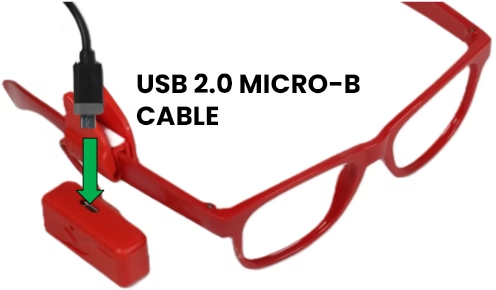
- Connect the small end of the micro USB cable to the charging port on top of the Colibri, as shown in the image. If the clip is blocking the port, move it by bending or twisting the adjustable shaft.
- Connect the other end of the cable to any 5V USB charger (not included), plug it into the wall outlet, and press the button on the back of the Colibri to turn it on. If everything is correct, the Colibri’s light will flash red, indicating that it is charging.
- When charging is complete, the light will flash green. Turn it off using the button, remove the cable, and follow the next steps.
SUPER TIP: The Colibri clip can be detached from the case to facilitate access to the charging port. Simply slide the flexible rod attachment in the case towards the on/off button.
Next step: Putting on the Colibri
Troubleshooting
When I plug in the charger, nothing happens.
The charging indicator light only flashes when the power button is in the “on” position. If the button is in the “off” position, charging occurs normally, but there is no indication. If the light does not flash even with the button on, there may be a problem with the USB cable or the power supply: try with another cable and power supply.
The charging indicator light does not turn green after 4 hours of charging.
Problems with the USB cable or USB power source can slow down charging. Check the USB cable and power source. If the problem persists, contact our support team.
What power sources are compatible with Colibri?
The Colibri requires a 5.0V DC power source. Any power source that meets the USB standard can be used to charge the Colibri. This includes cell phone chargers with a USB output (including fast-charging chargers), and USB ports on computers and laptops.
Can I use fast charging / Quick Charge sources?
Yes. The Colibri can be charged with chargers and power supplies that meet the following standards:
- Conventional charging,
- USBs and Quick Charge,
- Lightning,
- Qualcomm Quick Charge,
- Samsung Super Fast Charging and Adaptive Charging,
- Motorola TurboPower
Read more about USB fast charging standards
These systems allow the charged device to request higher voltages (above 5.0V) from the power source, but the Colibri does not use these features. The Colibri’s charging time is not reduced with fast charging sources.
The Colibri’s charging port is only compatible with USB Micro-B type cables, often known as “Micro USB” or “USB-V8”.
My Colibri's battery is running out very quickly.
The Colibri battery can last up to 30 hours of continuous use. If your battery is lasting significantly less, check if:
- the Colibri is charging correctly until the light flashes green;
- the Colibri’s whistle is not constantly activated, as the Colibri also uses energy to produce sound;
- the Colibri is not staying on when not in use;
If battery life continues to be reduced, contact support.
Can I charge the Colibri every night?
Yes. The Colibri can be recharged even if the battery is not completely depleted and can be recharged overnight.